maksim 发布的文章

我们来继续利用 Docker 搭建 PHP,目前主流的 PHP 运行模式还是基于 FPM,那么在这节中,我们来使用 Dcoker 搭建 PHP-FPM。

首先是下载镜像。

$ docker pull php:7.2.0-fpm-alpine3.6

$ php docker image ls | grep php
php           7.2-cli               dfdb1713d26a   23 months ago   365MB
php           7.2-cli-alpine3.6     27bfb4b1f223   4 years ago     74.1MB
php           7.2.0-fpm-alpine3.6   da8c99d32f95   4 years ago     75.4MB

其体积只有 76M,我们在运行容器时候可以使用 -d 让容器在后台运行。

$ docker run -d --rm -p 9000:9000 --name fpm-7.2 php:7.2.0-fpm-alpine3.6
0ea75f025c557b9cd4878a38219e5fa581ae66478ec321b91eec879ecf144fed
$ php docker ps | grep php
0ea75f025c55   php:7.2.0-fpm-alpine3.6   "docker-php-entrypoi…"   6 seconds ago   Up 6 seconds   0.0.0.0:9000->9000/tcp              fpm-7.2

接下来,我们安装 apache

# 拉取镜像
$ docker pull httpd:2.4-alpine

# 运行容器
docker run -d -p 80:80 --rm --name httpd-2.4 -v /home/maksim/src/php/:/usr/local/apache2/htdocs/ httpd:2.4-alpine

我们还是利用上一次我们编写的 Hello Docker! 脚本来进行演示,-v 可以将我们的本地目录挂在到 apache 容器中,

接下来,我们将 apache 的配置文件拷贝出来。

# . 代表当前目录,你可以设置成自己想要的目录
# 我的当前目录是 /home/maksim/src/conf/
$ docker cp httpd-2.4:/usr/local/apache2/conf/httpd.conf .
$ ls
httpd.conf

我们可以看到 httpd.conf 这样就被复制出来了,然后我们对其进行修改,支持 fpm。

# 将这三个模块加载放开

LoadModule proxy_module modules/mod_proxy.so
LoadModule proxy_http_module modules/mod_proxy_http.so
LoadModule proxy_fcgi_module modules/mod_proxy_fcgi.so

然后就是 docker 之间的通讯,如果没有指定 docker 容器的网络,默认情况下两个容器之间是在一个虚拟网络下,我们可以在两个容器之间通过虚拟 IP 进行通讯。

$ docker inspect fpm-7.2
...
"IPAddress": "172.17.0.3",
...

通过 inspect 命令我们可以查看 docker 容器的详细信息,我们将 apache 的代理设置为 172.17.0.3。

<VirtualHost *:80>
    ServerAdmin [email protected]
    DocumentRoot "/usr/local/apache2/htdocs"
    ServerName localhost
    <Directory "/usr/local/apache2/htdocs">
        Options None
        Require all granted
    </Directory>
    ProxyRequests Off
    ProxyPassMatch ^/(.*\.php)$ fcgi://172.17.0.4:9000/php/$1
</VirtualHost>

现在准备工作都已经结束了,我们开始重新开启容器。

# 停止当前容器
$ docker stop fpm-7.2 && docker stop httpd-2.4

# 启动 apache
docker run -d -p 80:80 --name httpd-2.4  -v /home/maksim/src/php/:/usr/local/apache2/htdocs/ -v /home/maksim/src/conf/httpd.conf:/usr/local/apache2/conf/httpd.conf httpd:2.4-alpine

# 启动 fpm
docker run -d -p 9000:9000 --name fpm-2.4 -v /home/maksim/src/php/:/php php:7.2.0-fpm-alpine3.6

至此我们就可以访问我们的应用程序了,如果启动后无法解析 php 文件,那么极有可能是 IP 发生了变更,我们可以再次查看 IP。

$ curl localhost/index.php
Hello Docker!

目前 Docker 部署算是比较流行的方式,在传统方式搭建生产环境时候我们需要人工进行编译,我们可以利用 Docker 来简化这一步操作,直接拉取官方镜像。

$ docker pull php:7.2-cli
$ docker image list | grep php
php   7.2-cli   dfdb1713d26a   23 months ago   365MB

这个镜像对于值运行 cli 程序来说镜像镜像有些太大了,镜像大就涉及到了拉取时间慢,而且占用磁盘资源,我们也可以选择 alpine 的版本,这是一个专门面向 docker 封装的精简版 Linux,其镜像要更小一些。

$ docker pull php:7.2-cli-alpine3.6

$ docker image list | grep php
php     7.2-cli             dfdb1713d26a   23 months ago   365MB
php     7.2-cli-alpine3.6   27bfb4b1f223   4 years ago     74.1MB

alpine 版本的 php-cli 总大小才 74.1MB。

接下来,我们来看一下该镜像中为我们打包好的 PHP 是否足以运行我们的 PHP 程序,最主要的就是看都安装了那些扩展。

$ docker run -it --rm php:7.2-cli-alpine3.6 php -m

该命令的意义如下:

[PHP Modules]
...
Core
ctype
curl
date
dom
fileinfo
....
[Zend Modules]

如果其扩展不足以支持我们的应用运行,我们可以选择基于官方的 Dockerfile 进行定制,同时如果将要基于当前镜像进行定制的话也可以编写自己的 Dockerfile。

接下来,利用该进行来执行我们的第一个应用程序。

$ cat /home/maksim/index.php
<?php

echo "Hello Docker!";

$ docker run -it --rm --name runphp -v /home/maksim/index.php:/usr/src/index.php php:7.2-cli-alpine3.6 php /usr/src/index.php
Hello Docker!%

这样 PHP 的 Cli 程序就可以运行了。

学习目标和内容

1、能够描述项目流程

2、能够了解PV、QPS、DAU等参数

3、能够实现服务器基本环境配置

4、能够部署配置MySQL生产环境

5、能够部署配置Nginx生产环境

6、能够部署配置PHP生产环境

7、能够理解PHP-FPM和Nginx关联关系

8、能够配置Nginx关联到PHP-FPM

运维十年演变发展史

项目开发流程

  1. 公司老板和产品经理根据市场调查,决定开发的一整套互联网产品:互动社交+电商+用户论坛(BBS)
  2. 产品决策(老板+产品+UI设计)=》代码开发(程序开发人员[前端开发[客户端页面或者APP]和后端开发[java php python node ruby])=》测试工作(测试人员)=》部署上线(运维人员)(SA、dev 开发ops 运维)

项目从开始策划,实施,上线,维护,一直到结束。称之为项目的生命周期。

作为运维人员来说,不仅仅是在上线流程中参与。

需要在策划,实施之初,就进行准备工作。学习对应架构和方案的知识点等。

比如:

  1. 项目代码使用lnmp架构,那么就需要对lnmp架构熟悉;
  2. 开发人员需要多人协作开发,合并代码,就需要服务器上搭建代码版本控制器;
  3. 测试人员需要用到的测试环境等等;

企业架构分布式集群解决方案

  • 集群:多台服务器在一起作同样的事 。
  • 分布式 :多台服务器在一起作不同的事 。

小饭店原来只有一个厨师,切菜洗菜备料炒菜全干。后来客人多了,厨房一个厨师忙不过来,又请了个厨师,两个厨师都能炒一样的菜,这两个厨师的关系是集群。为了让厨师专心炒菜,把菜做到极致,又请了个配菜师负责切菜,备菜,备料,厨师和配菜师的关系是分布式,一个配菜师也忙不过来了,又请了个配菜师,两个配菜师关系是集群

最终的架构图示,实现负载均衡LB、高可用HA、数据库主从复制M-S、读写分离R-W、缓存中间件[memcached、Redis] nosql[mongodb]·······

1.png

业务背景

年份:2008-2010

发布产品类型:互联网动态站点、社区论坛、商城、社交类站点

⽤户数量: 100-500

PV : 1000-3000(24小时访问次数总和 8小时) 页面访问数量 点击量

QPS: 5-10(每秒访问查询次数) 并发量 吞吐量 TPS RPS

DAU: 10-50(每日活跃用户数) 日活数 根据用户登录等方式

QPS 两种方法:

  1. 计算 pv/时间 = qps
  2. 压测 使用ab等并发测试软件 在规定时间发送一定的请求数量

服务器基本环境部署

为了学习的方便和需要,需要先进行基本环境的搭建

1、安装一台虚拟机,centos6.9操作系统

2、网络配置

3、机器名FQDN设置

4、DNS解析设置 本地Hosts解析

5、各类防火墙暂时关闭

6、配置需要的yum环境及其源地址

7、vim安装配置

8、网络校时 ntpd

虚拟机软件搭建

可以参考文档《虚拟机和镜像.doc》

准备好ISO镜像文件

这里安装系统镜像,采用minimal的方式,自定义选择开发工具。安装更加快速,系统也更加轻便。

可以参考文档《虚拟机和镜像.doc》

以上操作完成基本服务器镜像系统的安装

网络配置和检测

维护的机器数量比较多时,单独配置静态IP是很繁琐。这里使用NAT模式,DHCP自动分配IP

①vmware NAT连接方式,本地DHCP服务启用

2.jpg

注意NAT服务和DHCP服务需要启动

3.jpg

②IP租约和续约

4.jpg

不管采用何种方式获取到IP都可以,能够管理清晰和使用明白即可。

FQDN设置(重要)

在集群中配置FQDN,有助于进行区分主机身份。

server01 server01.lnmp.com

①添加修改/etc/hosts

 shell > vim /etc/hosts
 #在文件里追加一行
 192.168.17.102 server01.lnmp.com server01

②网卡配置/etc/sysconfig/network

 shell > vim /etc/sysconfig/network
 #修改HOSTNAME的值为server01
 HOSTNAME=server01

防火墙关闭

centos6.x系列中

关闭iptables

 #关闭iptables
 shell > service iptables stop
 #关闭开机自启动
 shell > chkconfig iptables off

关闭selinux

 #临时关闭
 shell > setenforce 0 &>>/dev/null
 #修改配置文件  永久关闭
 shell > sed -i "s/SELINUX=enforcing/SELINUX=disabled/" /etc/selinux/config;

yum源环境配置

配置本地光盘源,使用centos的两个光盘:

①虚拟机添加新光驱并选择光盘路径

5.jpg

注意添加设备,需要关闭虚拟机里的操作系统

6.jpg

7.jpg

②linux挂载多个光盘

 #建立光盘挂载目录文件夹
 shell > mkdir /dvd1 /dvd2
 #手动挂载光盘 顺便调整光盘顺序
 shell > mount /dev/sr0 /dvd2
 shell > mount /dev/sr1 /dvd1
 #lsblk查看是否挂载成功
 #添加到开启加载脚本  开机自动挂载光盘
 shell > echo "mount /dev/sr0 /dvd2" >> /etc/rc.local
 shell > echo "mount /dev/sr1 /dvd1" >> /etc/rc.local

③配置yum本地光盘源

 shell > cd /etc/yum.repos.d
 shell > mkdir bak
 #移动默认源 备份并使其失效
 shell > mv ./* ./bak
 #按照挂载光盘位置,配置光盘源

安装vim编辑器并配置

①yum 安装vim配置显示行号

 shell > yum -y install vim
 #配置vim默认显示行号
 shell > echo "set nu" >> /root/.vimrc

②grep搜索关键字高亮显示

 #搜索关键字高亮
 shell > sed -i "8calias grep='grep --color'" /root/.bashrc
 #当前窗口重新加载配置
 shell > source /root/.bashrc

8、网络校时(重要)

服务器校时的原因:

①因为计划任务要执行,提供准确的时间

②服务器间进行通信时,需要统一的一致时间

 #安装校时命令和服务
 shell > yum -y install ntp
 #开启ntpd服务
 shell > service ntpd start
 #开机自启ntpd
 shell > chkconfig ntpd on

国内第三方NTP校时网址

https://opsx.alibaba.com/service?lang=zh-cn&activeKey=2

企业服务器LNMP环境搭建

常见的软件架构:

①C/S client/server

②B/S browser/server

不管是C还是B,都是属于客户端属于前端。那么运维人员主要负责和管理的是server端,也统称为服务器端。为了能够提供快速的提供服务端使用,互联网中有多种解决方案和架构,其中以下两种架构有着广泛的使用基础。

1> LAMP Linux+Apache+MySQL+PHP2> LNMP Linux+Nginx+MySQL+PHP

lnmpa nginx+mysql+php+apache

lnmt nginx+mysql+tomcat(jdk)

nginx+mysql+(python+nodejs|ruby)

之前已经学习过了LAMP架构,接上来学习LNMP架构解决方案。

在企业中搭建实际业务环境时,一般依赖文件(小文件)使用yum安装解决,生产业务环境需要使用源码编译的方式进行安装。

源码编译预估时间:

Mysql 852s≈15m

Nginx 27s≈1m

PHP 564s≈10m

MySQL

1.1、相关参数介绍

编译参数的说明

参数作用
-DCMAKE_INSTALL_PREFIX安装到的软件目录
-DMYSQL_DATADIR数据文件存储的路径
-DSYSCONFDIR配置文件路径 (my.cnf)
-DENABLED_LOCAL_INFILE=1使用localmysql客户端的配置
-DWITH_PARTITION_STORAGE_ENGINE使mysql支持分表
-DEXTRA_CHARSETS安装支持的字符集
-DDEFAULT_CHARSET默认字符集使用 这里配置为utf8mb4
-DDEFAULT_COLLATION连接字符集
-DWITH_SSL开启mysql的ssl使用

初始化参数说明

--basedir安装到的软件目录
--datadir数据文件存储路径
--usermysql使用的用户

1.2、脚本实现安装及其初始化

 #!/bin/bash
 #源码编译安装MySQL
 mysql_install() {
     #1、创建用户
 `id mysql` &>/dev/null
 [ $? -ne 0 ] && useradd -s /sbin/nologin -M mysql
 #2、解决依赖
 yum install -y cmake
 yum install -y ncurses-devel
 #3、编译安装
 cd /root/soft
 tar zxvf mysql-5.6.33.tar.gz
 cd mysql-5.6.33
 cmake \
 -DCMAKE_INSTALL_PREFIX=/usr/local/mysql \
 -DMYSQL_DATADIR=/usr/local/mysql/data \
 -DSYSCONFDIR=/etc \
 -DENABLED_LOCAL_INFILE=1 \
 -DWITH_PARTITION_STORAGE_ENGINE=1 \
 -DEXTRA_CHARSETS=all \
 -DDEFAULT_CHARSET=utf8mb4 \
 -DDEFAULT_COLLATION=utf8mb4_general_ci\
 -DWITH_SSL=bundled
 make && make install
 #配置文件
 rm -rf /etc/my.cnf
 cp /usr/local/mysql/support-files/my-default.cnf /etc/my.cnf
 #授权并初始化数据库
 chown -R mysql:mysql /usr/local/mysql
 /usr/local/mysql/scripts/mysql_install_db --basedir=/usr/local/mysql --datadir=/usr/local/mysql/data --user=mysql
 #配置服务、自启动和环境变量
 cp /usr/local/mysql/support-files/mysql.server /etc/init.d/mysqld
 service mysqld start
 chkconfig --add mysqld
 echo 'PATH=/usr/local/mysql/bin:$PATH' >> /etc/profile
 #删除匿名用户
 #设置root域名的密码
 rpm -qa|grep expect
 if [ $? -ne 0 ];then
    yum -y install expect
 fi
 #导入环境变量PATH
 export PATH=/usr/local/mysql/bin:$PATH
 #初始化root密码 删除匿名用户
 echo '#!/usr/bin/expect
 set timeout 60
 spawn mysql_secure_installation
 expect {
 "enter for none" { send "\r"; exp_continue}
 "Y/n" { send "Y\r" ; exp_continue}
 "password" { send "123456\r"; exp_continue}
 "Cleaning up" { send "\r"}
 }
 interact ' > mysql_secure_installation.exp
 chmod +x mysql_secure_installation.exp
 ./mysql_secure_installation.exp
 }
 #脚本开始时间
 start_time=`date +%s`
 #执行的脚本代码
 mysql_install
 #脚本结束时间
 end_time=`date +%s`
 #脚本执行花费时间
 const_time=$((end_time-start_time))
 echo 'Take time is: '$const_time's'

2、Nginx

2.1、介绍

常见用法:

1) web服务器软件 httpd http协议

同类的web服务器软件:apache nginx(俄罗斯) IIS(微软 fastcgi) lighttpd(德国)

2)代理服务器 反向代理

3)邮箱代理服务器 IMAP POP3 SMTP

4)负载均衡功能 LB loadblance

Nginx架构的特点:

①高可靠:稳定性 master进程 管理调度请求分发到哪一个worker=> worker进程 响应请求 一master多worker

热部署 :(1)平滑升级 (2)可以快速重载配置

高并发:可以同时响应更多的请求 事件 epoll模型 几万

响应快:尤其在处理静态文件上,响应速度很快 sendfile

低消耗:cpu和内存 1w个请求 内存2-3MB

分布式支持 :反向代理 七层负载均衡

官方网址:http://nginx.org/

2.2、安装

常见安装方式:

①yum安装配置,需使用Nginx官方源或者EPEL源

②源码编译

问题编译过程中出现问题:

9.jpg

10.jpg

11.jpg

依赖解决

 shell > yum -y install pcre-devel zlib-devel openssl-devel

安装步骤及其脚本

 #!/bin/bash
 #编译安装Nginx
 nginx_install(){
 #创建软件运行用户
 `id www` &>>/dev/null
 if [ $? -ne 0 ];then
    useradd -s/sbin/nologin -M www
 fi
 #安装依赖
 yum -y install pcre-devel zlib-devel openssl-devel
 #编译安装
 cd /root/soft
 tar xvf nginx-1.14.2.tar.gz
 cd nginx-1.14.2
 ./configure --prefix=/usr/local/nginx --user=www --group=www --with-http_ssl_module --with-http_stub_status_module --with-http_realip_module && make && make install
 }
 #脚本开始时间
 start_time=`date +%s`
 #执行的脚本代码
 nginx_install
 #脚本结束时间
 end_time=`date +%s`
 #脚本执行花费时间
 const_time=$((end_time-start_time))
 echo 'Take time is: '$const_time's'

编译参数说明

参数作用
--prefix编译安装到的软件目录
--userworker进程运行用户
--groupworker进程运行用户组
--with-http_ssl_module支持https 需要pcel-devel依赖
--with-http_stub_status_module基本状态信息显示 查看请求数、连接数等
--with-http_realip_module定义客户端地址和端口为header头信息 常用于反向代理后的真实IP获取

2.3、目录介绍

查看安装目录/usr/local/nginx

目录作用
conf配置文件
html网站默认目录
logs日志
sbin可执行文件 [软件的启动 停止 重启等]

2.4、软件操作参数

查看nginx的二进制可执行文件的相关参数

 shell > cd /usr/local/nginx/sbin
 shell > ./nginx -h

执行后显示

 nginx version: nginx/1.14.2
 Usage: nginx [-?hvVtTq] [-s signal] [-c filename] [-p prefix] [-g directives]
 
 Options:
 #查看帮助
   -?,-h         : this help
 #查看版本并退出
   -v            : show version and exit
 #查看版本和配置选项并退出
   -V            : show version and configure options then exit
 #检测配置文件语法并退出
   -t            : test configuration and exit
 #检测配置文件语法打印它并退出
   -T            : test configuration, dump it and exit
 #在配置测试期间禁止显示非错误信息
   -q            : suppress non-error messages during configuration testing
 #发送信号给主进程  stop强制退出  quit优雅的退出  reopen重开日志   reload重载配置
   -s signal     : send signal to a master process: stop, quit, reopen, reload
 #设置nginx目录  $prefix路径
   -p prefix     : set prefix path (default: /usr/local/nginx/)
 #指定启动使用的配置文件
   -c filename   : set configuration file (default: conf/nginx.conf)
 #在配置文件之外设置全局指令
   -g directives : set global directives out of configuration file

一般主要使用:

  • s参数控制管理nginx服务
  • V参数查看nginx开启的模块和编译参数
  • t参数检测配置文件是否有错误

2.5、服务配置

①使用社区的服务配置文件

nginx编译包里默认没有服务启动脚本模板,可以通过社区获得

https://www.nginx.com/resources/wiki/start/topics/examples/redhatnginxinit/

上传脚本到/etc/init.d目录下

 shell > vim /etc/init.d/nginx

修改软件和配置路径

 #执行文件路径  第22行
 nginx="/usr/local/nginx/sbin/nginx"
 #配置文件路径  第25行
 NGINIX_CONF_FILE="/usr/local/nginx/conf/nginx.conf"

②添加自启动

 shell > chmod +x /etc/init.d/nginx
 shell > chkconfig --add nginx
 shell > chkconfig nginx on

注意在服务脚本中,有chkconfig配置开启模式、开启顺序、关闭顺序设置

 #!/bin/sh
 #
 # nginx - this script starts and stops the nginx daemon
 #              开启模式(0-6)   开启顺序  关闭顺序
 # chkconfig:   - 85 15

3、PHP

3.1、介绍

PHP(外文名:PHP: Hypertext Preprocessor,中文名:“超文本预处理器”)是一种通用开源脚本语言。语法吸收了C语言、Java和Perl的特点,利于学习,使用广泛,主要适用于Web开发领域。PHP 独特的语法混合了C、Java、Perl以及PHP自创的语法。它可以比CGI或者Perl更快速地执行动态网页。用PHP做出的动态页面与其他的编程语言相比,PHP是将程序嵌入到HTML(标准通用标记语言下的一个应用)文档中去执行,执行效率比完全生成HTML标记的CGI要高许多;PHP还可以执行编译后代码,编译可以达到加密和优化代码运行,使代码运行更快。

PHP-FPM(FastCGI Process Manager:FastCGI进程管理器)对于PHP 5.3.3之前的php来说,是一个补丁包 ,旨在将FastCGI进程管理整合进PHP包中。
相对Spawn-FCGI,PHP-FPM在CPU和内存方面的控制都更胜一筹,而且前者很容易崩溃,必须用crontab定时进行监控,而PHP-FPM则没有这种烦恼。
PHP5.3.3已经集成php-fpm了,不再是第三方的包了。PHP-FPM提供了更好的PHP进程管理方式,可以有效控制内存和进程、可以平滑重载PHP配置,比spawn-fcgi具有更多优点,所以被PHP官方收录了。在./configure的时候带 –enable-fpm参数即可开启PHP-FPM。

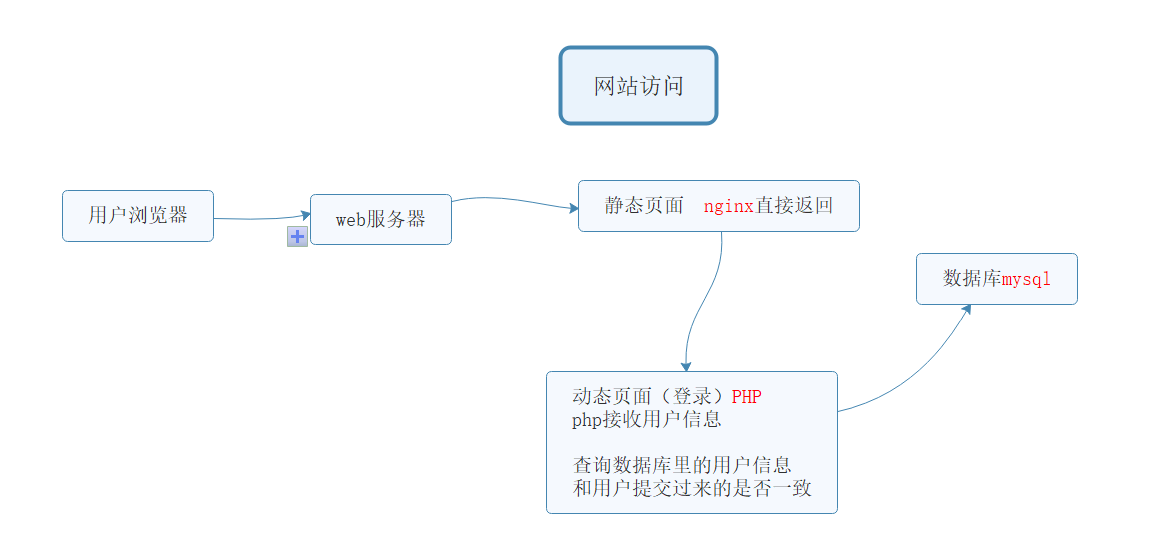
页面分类:

静态页面 一般普通访问到的页面

动态页面 用户可以和服务器进行交互页面

执行动态页面,需要和服务器进行交互,使用后端语言进行开发

LNMP 使用php进行开发交互

13.png

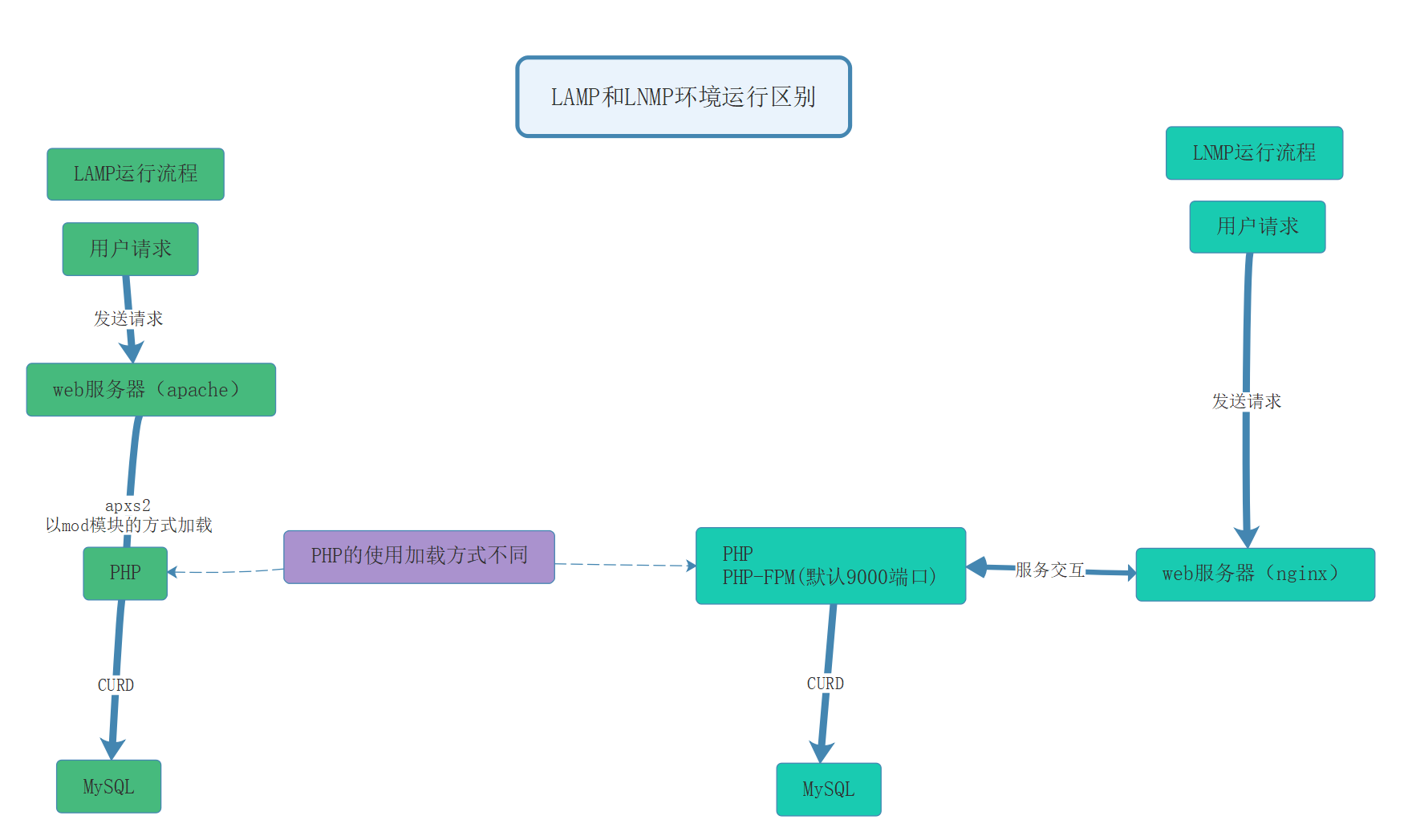
LAMP和LNMP在使用和配置PHP的区别:

14.png

3.2、安装

解压进入目录

 shell > tar zxf php-7.2.12.tar.gz
 shell > cd php-7.2.12

编译参数配置

 shell > ./configure --prefix=/usr/local/php --with-config-file-path=/usr/local/php/etc --enable-fpm --with-fpm-user=www --with-fpm-group=www --with-mysqli=mysqlnd --with-pdo-mysql=mysqlnd --with-iconv-dir --with-freetype-dir --with-jpeg-dir --with-png-dir --with-zlib --with-libxml-dir --enable-xml --disable-rpath --enable-bcmath --enable-shmop --enable-sysvsem --enable-inline-optimization --with-curl --enable-mbregex --enable-mbstring --enable-ftp --with-gd --with-openssl --with-mhash --enable-pcntl --enable-sockets --with-xmlrpc --with-libzip --enable-soap --without-pear --with-gettext --disable-fileinfo --enable-maintainer-zts

--with 代表需要手动开启 可能需要加载第三方模块 第三方模块没有,就会error

  • -enable 代表开启php的默认功能
  • -without 关闭默认加载的模块

解决遇到的依赖软件问题

15.jpg

16.jpg

17.jpg

18.jpg

 shell > yum -y install libxml2-devel libjpeg-devel libpng-devel freetype-devel curl-devel openssl-devel

编译并安装到目录

 shell > make && make install

查看PHP的安装目录

 shell > cd /usr/local/php
 shell > ls
目录名称作用
binphp相关命令目录 php phpize、php-config在源码编译扩展时用
etc配置文件目录
includephp默认类库
libphp第三方扩展类库
phpman文档文件
sbinphp-fpm执行文件
varlog日志目录 run运行目录 保存pid文件

3.3、配置

使用php-fpm进行管理php服务,有两个配置文件:

①php.ini #默认php配置文件

②php-fpm.conf #php-fpm相关的配置

复制配置文件

 shell > cp /usr/local/php/etc/php-fpm.conf.default /usr/local/php/etc/php-fpm.conf
 shell > cp /usr/local/php/etc/php-fpm.d/www.conf.default /usr/local/php/etc/php-fpm.d/www.conf
 shell > cp /root/soft/php-7.2.12/php.ini-development /usr/local/php/etc/php.ini

添加启动服务

 shell > cp /root/soft/php-7.2.12/sapi/fpm/init.d.php-fpm /etc/init.d/php-fpm
 shell > chmod +x /etc/init.d/php-fpm
 shell > chkconfig --add php-fpm

添加环境变量(方便php、phpize、phpconfig查找使用)

 shell > echo 'PATH=/usr/local/php/bin:$PATH' >> /etc/profile
 shell > source /etc/profile

php安装脚本及其初始化配置

以下脚本,作为编译安装和配置php的参考

 #!/bin/bash
 php_install(){
 #php编译安装
 #和nginx使用相同的用户,如果没有就创建
 `id www` &> /dev/null
 [ $? -ne 0 ] && useradd -s /sbin/nologin -M www
 #解决依赖
 yum -y install libxml2-devel libjpeg-devel libpng-devel freetype-devel curl-devel openssl-devel
 #解压
 tar xvf php-7.2.12.tar.gz
 cd php-7.2.12
 #编译安装php
 ./configure --prefix=/usr/local/php --with-config-file-path=/usr/local/php/etc --enable-fpm --with-fpm-user=www --with-fpm-group=www --with-mysqli=mysqlnd --with-pdo-mysql=mysqlnd --with-iconv-dir --with-freetype-dir --with-jpeg-dir --with-png-dir --with-zlib --with-libxml-dir --enable-xml --disable-rpath --enable-bcmath --enable-shmop --enable-sysvsem --enable-inline-optimization --with-curl --enable-mbregex --enable-mbstring --enable-ftp --with-gd --with-openssl --with-mhash --enable-pcntl --enable-sockets --with-xmlrpc --with-libzip --enable-soap --without-pear --with-gettext --disable-fileinfo --enable-maintainer-zts && make && make install
 #配置文件初始化
 cp php.ini-development /usr/local/php/etc/php.ini
 #php-fpm服务配置文件
 cp /usr/local/php/etc/php-fpm.conf.default /usr/local/php/etc/php-fpm.conf
 #php-fpm服务子配置文件
 cp /usr/local/php/etc/php-fpm.d/www.conf.default /usr/local/php/etc/php-fpm.d/www.conf
 #配置服务及其环境变量
 cp /root/soft/php-7.2.12/sapi/fpm/init.d.php-fpm /etc/init.d/php-fpm
 chmod +x /etc/init.d/php-fpm
 service php-fpm start
 chkconfig --add php-fpm
 echo 'PATH=/usr/local/php/bin:$PATH' >> /etc/profile
 }
 #脚本开始时间
 start_time=`date +%s`
 #执行的脚本代码
 php_install
 #脚本结束时间
 end_time=`date +%s`
 #脚本执行花费时间
 const_time=$((end_time-start_time))
 echo 'Take time is: '$const_time's'

3.4、Nginx+php-fpm配置

①编写测试文件

 shell > vim /usr/local/nginx/html/index.php

文件内容

 <?php
     phpinfo();

②在nginx.conf中配置

修改配置文件,告知nginx如果接收到.php结尾的请求,交由给php-fpm进行处理

 shell  > vim /usr/local/nginx/conf/nginx.conf

打开location .php 结尾那一段注释,并修改script为$document_root

#1、把root变量提升上层
 root html;
         location / {
             #root   html;
             index  index.html index.htm;
         }
 
         #error_page  404              /404.html;
 
         # redirect server error pages to the static page /50x.html
         #
         error_page   500 502 503 504  /50x.html;
         location = /50x.html {
             root   html;
         }
 
         # proxy the PHP scripts to Apache listening on 127.0.0.1:80
         #
         #location ~ \.php$ {
         #    proxy_pass   http://127.0.0.1;
         #}
 
         # pass the PHP scripts to FastCGI server listening on 127.0.0.1:9000
         #
         location ~ \.php$ {
           #2、默认使用上层的root变量
         #    root           html;
             fastcgi_pass   127.0.0.1:9000;
             fastcgi_index  index.php;
           #3、把script修改为$document_root  $document_root 就是上面的root
             fastcgi_param  SCRIPT_FILENAME  $document_root$fastcgi_script_name;
             include        fastcgi_params;
         }

企业级 PHP 高并发解决方案 0x01 LNMP 环境搭建

环境设置

在拿到新的服务器或者虚拟机的时候,我们首先需要保证我们的环境是被正确配置的,这样可以减少生产环境出现问题的概率,这篇文章主要是用来讲解 PHP 的环境搭建。

FQDN 设置(重要)

FQDN(Fully Qualified Domain Name 全限定域名) 是用来识别我们的主机身份,这一点非常重要。

例如:主机名是 server01 , 域名是 maksim.website ,那么FQDN就是 server01.maksim.website。

step 1. 修改 /etc/hosts

$ > vim /etc/hosts
# 在文件里追加一行
192.168.17.101  server01.maksim.website server01

step 2. 配置网卡

$ > vim /etc/sysconfig/network
# 修改 HOSTNAME 的值为 server01
HOSTNAME=server01

关闭 selinux

SELinux 是 2.6 版本的 Linux 内核中提供的强制访问控制(MAC)系统,对于目前的linux系统来说基本都内置开启了该安全增强的 selinux 内核模块。但是它虽然安全,但是对于一般的用户来说,过于复杂,而且如果开启 selinux 有的时候回出现各种各样的问题。

# 临时关闭
$ > setenforce 0 &>> /dev/null
# 永久关闭
$ > sed -i "s/SELINUX=enforcing/SELINUX=disabled/" /etc/selinux/config

网络校时 (重要)

服务器时间需要校准的主要原因如下:

  1. 计划任务要执行,需要提供一个可靠的时间
  2. 服务期间进行通信,需要统一的一致时间
# 安装时命令和服务
$ > yum install ntp -y
# 开启 ntpd start
$ > service netpd start
# 开启自启动 ntpd
$ > chkconfig ntpd on

国内第三方 NTP : https://opsx.alibaba.com/service?lang=zh-cn&activeKey=2

源码编译安装 LNMP

在生产环境 yum 安装的一般是依赖文件(小文件),例如 vim ,gcc,make, 等命令,而像 PHP、 Nginx、MySQL 这些都需要使用源码进行编译安装,这是因为可以定制化配置,尤其是有软件允许我们开发一些二次开发,我们需要在安装的时候编译到可执行文件中去。

软件名称预计编译时间
MySQL852s ~ 15m
Nginx27s ~ 1m
PHP564s ~ 10m6

这是我在工作中总结的一个编译耗时。

编译MySQL

相关参数介绍

编译参数的说明

-DCMAKE_INSTALL_PREFIX安装到的软件目录
-DMYSQL_DATADIR数据文件存储的路径
-DSYSCONFDIR配置文件路径 (my.cnf)
-DENABLED_LOCAL_INFILE=1使用localmysql客户端的配置
-DWITH_PARTITION_STORAGE_ENGINE使mysql支持分表
-DEXTRA_CHARSETS安装支持的字符集
-DDEFAULT_CHARSET默认字符集使用 这里配置为utf8mb4
-DDEFAULT_COLLATION连接字符集
-DWITH_SSL开启mysql的ssl使用

初始化参数说明

--basedir安装到的软件目录
--datadir数据文件存储路径
--usermysql使用的用户

脚本实现安装及其初始化

#!/bin/bash
#源码编译安装MySQL
mysql_install() {
  #1、创建用户
  $(id mysql) &>/dev/null
  [ $? -ne 0 ] && useradd -s /sbin/nologin -M mysql
  #2、解决依赖
  yum install -y cmake
  yum install -y ncurses-devel
  #3、编译安装
  cd /root/soft
  tar zxvf mysql-5.6.33.tar.gz
  cd mysql-5.6.33
  cmake \
    -DCMAKE_INSTALL_PREFIX=/usr/local/mysql \
    -DMYSQL_DATADIR=/usr/local/mysql/data \
    -DSYSCONFDIR=/etc \
    -DENABLED_LOCAL_INFILE=1 \
    -DWITH_PARTITION_STORAGE_ENGINE=1 \
    -DEXTRA_CHARSETS=all \
    -DDEFAULT_CHARSET=utf8mb4 \
    -DDEFAULT_COLLATION=utf8mb4_general_ci-DWITH_SSL=bundled
  make && make install
  #配置文件
  rm -rf /etc/my.cnf
  cp /usr/local/mysql/support-files/my-default.cnf /etc/my.cnf
  #授权并初始化数据库
  chown -R mysql:mysql /usr/local/mysql
  /usr/local/mysql/scripts/mysql_install_db --basedir=/usr/local/mysql --datadir=/usr/local/mysql/data --user=mysql
  #配置服务、自启动和环境变量
  cp /usr/local/mysql/support-files/mysql.server /etc/init.d/mysqld
  service mysqld start
  chkconfig --add mysqld
  echo 'PATH=/usr/local/mysql/bin:$PATH' >>/etc/profile
  #删除匿名用户
  #设置root域名的密码
  rpm -qa | grep expect
  if [ $? -ne 0 ]; then
    yum -y install expect
  fi
  #导入环境变量PATH
  export PATH=/usr/local/mysql/bin:$PATH
  #初始化root密码 删除匿名用户
  echo '#!/usr/bin/expect
set timeout 60
spawn mysql_secure_installation
expect {
"enter for none" { send "\r"; exp_continue}
"Y/n" { send "Y\r" ; exp_continue}
"password" { send "123456\r"; exp_continue}
"Cleaning up" { send "\r"}
}
interact ' >mysql_secure_installation.exp
  chmod +x mysql_secure_installation.exp
  ./mysql_secure_installation.exp
}
#脚本开始时间
start_time=$(date +%s)
#执行的脚本代码
mysql_install
#脚本结束时间
end_time=$(date +%s)
#脚本执行花费时间
const_time=$((end_time - start_time))
echo 'Take time is: '$const_time's'

编译安装 Nginx

常见用法:

  1. web服务器软件 httpd http协议,同类的web服务器软件:apache nginx(俄罗斯) IIS(微软 fastcgi) lighttpd(德国)
  2. 代理服务器 ,反向代理
  3. 邮箱代理服务器 IMAP POP3 SMTP
  4. 负载均衡功能 LB loadblance

Nginx架构的特点:

  • 高可靠:稳定性 master进程 管理调度请求分发到哪一个worker=> worker进程 响应请求 一master多worker
  • 热部署 :(1)平滑升级 (2)可以快速重载配置
  • 高并发:可以同时响应更多的请求 事件 epoll模型 几万
  • 响应快:尤其在处理静态文件上,响应速度很快 sendfile
  • 低消耗:cpu和内存 1w个请求 内存2-3MB
  • 分布式支持 :反向代理 七层负载均衡

安装

安装依赖

shell > yum -y install pcre-devel zlib-devel openssl-devel

自动化脚本

#!/bin/bash
#编译安装Nginx
nginx_install(){
#创建软件运行用户
`id www` &>>/dev/null
if [ $? -ne 0 ];then
   useradd -s/sbin/nologin -M www
fi
#安装依赖
yum -y install pcre-devel zlib-devel openssl-devel
#编译安装
cd /root/soft
tar xvf nginx-1.14.2.tar.gz
cd nginx-1.14.2
./configure --prefix=/usr/local/nginx --user=www --group=www --with-http_ssl_module --with-http_stub_status_module --with-http_realip_module && make && make install
}
#脚本开始时间
start_time=`date +%s`
#执行的脚本代码
nginx_install
#脚本结束时间
end_time=`date +%s`
#脚本执行花费时间
const_time=$((end_time-start_time))
echo 'Take time is: '$const_time's'

编译参数说明

参数作用
--prefix编译安装到的软件目录
--userworker进程运行用户
--groupworker进程运行用户组
--with-http_ssl_module支持https 需要==pcel-devel==依赖
--with-http_stub_status_module基本状态信息显示 查看请求数、连接数等
--with-http_realip_module定义客户端地址和端口为header头信息 常用于反向代理后的真实IP获取

目录介绍

查看安装目录/usr/local/nginx

目录作用
conf配置文件
html网站默认目录
logs日志
sbin可执行文件 [软件的启动 停止 重启等]

软件操作参数

查看nginx的二进制可执行文件的相关参数

shell > cd /usr/local/nginx/sbin
shell > ./nginx -h

执行后显示

nginx version: nginx/1.14.2
Usage: nginx [-?hvVtTq] [-s signal] [-c filename] [-p prefix] [-g directives]

Options:
#查看帮助
  -?,-h         : this help
#查看版本并退出
  -v            : show version and exit
#查看版本和配置选项并退出
  -V            : show version and configure options then exit
#检测配置文件语法并退出
  -t            : test configuration and exit
#检测配置文件语法打印它并退出
  -T            : test configuration, dump it and exit
#在配置测试期间禁止显示非错误信息
  -q            : suppress non-error messages during configuration testing
#发送信号给主进程  stop强制退出  quit优雅的退出  reopen重开日志   reload重载配置
  -s signal     : send signal to a master process: stop, quit, reopen, reload
#设置nginx目录  $prefix路径
  -p prefix     : set prefix path (default: /usr/local/nginx/)
#指定启动使用的配置文件
  -c filename   : set configuration file (default: conf/nginx.conf)
#在配置文件之外设置全局指令
  -g directives : set global directives out of configuration file

一般主要使用:

-s参数控制管理nginx服务

-V参数查看nginx开启的模块和编译参数

-t参数检测配置文件是否有错误

服务配置

① 使用社区的服务配置文件

nginx编译包里默认没有服务启动脚本模板,可以通过社区获得

https://www.nginx.com/resources/wiki/start/topics/examples/redhatnginxinit/

上传脚本到/etc/init.d目录下

shell > vim /etc/init.d/nginx

修改软件和配置路径

#执行文件路径  第22行
nginx="/usr/local/nginx/sbin/nginx"
#配置文件路径  第25行
NGINIX_CONF_FILE="/usr/local/nginx/conf/nginx.conf"

②添加自启动

shell > chmod +x /etc/init.d/nginx
shell > chkconfig --add nginx
shell > chkconfig nginx on

注意在服务脚本中,有chkconfig配置开启模式、开启顺序、关闭顺序设置

#!/bin/sh
#
# nginx - this script starts and stops the nginx daemon
#              开启模式(0-6)   开启顺序  关闭顺序      
# chkconfig:   - 85 15

PHP

PHP(外文名:PHP: Hypertext Preprocessor,中文名:“超文本预处理器”)是一种通用开源脚本语言。语法吸收了C语言、Java和Perl的特点,利于学习,使用广泛,主要适用于Web开发领域

PHP 独特的语法混合了C、Java、Perl以及PHP自创的语法。它可以比CGI或者Perl更快速地执行动态网页。用PHP做出的动态页面与其他的编程语言相比,PHP是将程序嵌入到HTML(标准通用标记语言下的一个应用)文档中去执行,执行效率比完全生成HTML标记的CGI要高许多;PHP还可以执行编译后代码,编译可以达到加密和优化代码运行,使代码运行更快。

PHP-FPM(FastCGI Process Manager:FastCGI进程管理器**,对于PHP 5.3.3之前的php来说,是一个补丁包 ,旨在将FastCGI进程管理整合进PHP包中。

相对Spawn-FCGI,PHP-FPM在CPU和内存方面的控制都更胜一筹,而且前者很容易崩溃,必须用crontab定时进行监控,而PHP-FPM则没有这种烦恼。
PHP5.3.3已经集成php-fpm了,不再是第三方的包了。PHP-FPM提供了更好的PHP进程管理方式,可以有效控制内存和进程、可以平滑重载PHP配置,比spawn-fcgi具有更多优点,所以被PHP官方收录了。在./configure的时候带 –enable-fpm参数即可开启PHP-FPM**。

页面分类:

  • 静态页面 一般普通访问到的页面
  • 动态页面 用户可以和服务器进行交互页面

执行动态页面,需要和服务器进行交互,使用后端语言进行开发

LNMP 使用php进行开发交互

l8u0o1vi.png

LAMP和LNMP在使用和配置PHP的区别:

l8u0nlt0.png

安装

shell > yum -y install libxml2-devel libjpeg-devel libpng-devel freetype-devel curl-devel openssl-devel

解压进入目录

shell > tar zxf php-7.2.12.tar.gz
shell > cd php-7.2.12

编译参数配置

shell > ./configure --prefix=/usr/local/php --with-config-file-path=/usr/local/php/etc --enable-fpm --with-fpm-user=www --with-fpm-group=www --with-mysqli=mysqlnd --with-pdo-mysql=mysqlnd --with-iconv-dir --with-freetype-dir --with-jpeg-dir --with-png-dir --with-zlib --with-libxml-dir --enable-xml --disable-rpath --enable-bcmath --enable-shmop --enable-sysvsem --enable-inline-optimization --with-curl --enable-mbregex --enable-mbstring --enable-ftp --with-gd --with-openssl --with-mhash --enable-pcntl --enable-sockets --with-xmlrpc --with-libzip --enable-soap --without-pear --with-gettext --disable-fileinfo --enable-maintainer-zts

--with 代表需要手动开启 可能需要加载第三方模块 第三方模块没有,就会error

--enable 代表开启php的默认功能

--without 关闭默认加载的模块

编译并安装到目录

shell > make && make install

查看PHP的安装目录

shell > cd /usr/local/php
shell > ls
目录名称作用
binphp相关命令目录 php phpize、php-config在源码编译扩展时用
etc配置文件目录
includephp默认类库
libphp第三方扩展类库
phpman文档文件
sbinphp-fpm执行文件
varlog日志目录 run运行目录 保存pid文件

配置

使用php-fpm进行管理php服务,有两个配置文件:

①php.ini #默认php配置文件

②php-fpm.conf #php-fpm相关的配置

复制配置文件

shell > cp /usr/local/php/etc/php-fpm.conf.default /usr/local/php/etc/php-fpm.conf
shell > cp /usr/local/php/etc/php-fpm.d/www.conf.default /usr/local/php/etc/php-fpm.d/www.conf
shell > cp /root/soft/php-7.2.12/php.ini-development /usr/local/php/etc/php.ini

添加启动服务

shell > cp /root/soft/php-7.2.12/sapi/fpm/init.d.php-fpm /etc/init.d/php-fpm
shell > chmod +x /etc/init.d/php-fpm
shell > chkconfig --add php-fpm

添加环境变量(方便php、phpize、phpconfig查找使用)

shell > echo 'PATH=/usr/local/php/bin:$PATH' >> /etc/profile
shell > source /etc/profile

php安装脚本及其初始化配置

以下脚本,作为编译安装和配置php的参考

#!/bin/bash
php_install(){
#php编译安装
#和nginx使用相同的用户,如果没有就创建
`id www` &> /dev/null
[ $? -ne 0 ] && useradd -s /sbin/nologin -M www
#解决依赖
yum -y install libxml2-devel libjpeg-devel libpng-devel freetype-devel curl-devel openssl-devel
#解压
tar xvf php-7.2.12.tar.gz
cd php-7.2.12
#编译安装php
./configure --prefix=/usr/local/php --with-config-file-path=/usr/local/php/etc --enable-fpm --with-fpm-user=www --with-fpm-group=www --with-mysqli=mysqlnd --with-pdo-mysql=mysqlnd --with-iconv-dir --with-freetype-dir --with-jpeg-dir --with-png-dir --with-zlib --with-libxml-dir --enable-xml --disable-rpath --enable-bcmath --enable-shmop --enable-sysvsem --enable-inline-optimization --with-curl --enable-mbregex --enable-mbstring --enable-ftp --with-gd --with-openssl --with-mhash --enable-pcntl --enable-sockets --with-xmlrpc --with-libzip --enable-soap --without-pear --with-gettext --disable-fileinfo --enable-maintainer-zts && make && make install
#配置文件初始化
cp php.ini-development /usr/local/php/etc/php.ini
#php-fpm服务配置文件
cp /usr/local/php/etc/php-fpm.conf.default /usr/local/php/etc/php-fpm.conf
#php-fpm服务子配置文件
cp /usr/local/php/etc/php-fpm.d/www.conf.default /usr/local/php/etc/php-fpm.d/www.conf
#配置服务及其环境变量
cp /root/soft/php-7.2.12/sapi/fpm/init.d.php-fpm /etc/init.d/php-fpm
chmod +x /etc/init.d/php-fpm
service php-fpm start
chkconfig --add php-fpm
echo 'PATH=/usr/local/php/bin:$PATH' >> /etc/profile
}
#脚本开始时间
start_time=`date +%s`
#执行的脚本代码
php_install
#脚本结束时间
end_time=`date +%s`
#脚本执行花费时间
const_time=$((end_time-start_time))
echo 'Take time is: '$const_time's'

Nginx+php-fpm配置

①编写测试文件

shell > vim /usr/local/nginx/html/index.php

文件内容

<?php
    phpinfo();

②在nginx.conf中配置

修改配置文件,告知nginx如果接收到.php结尾的请求,交由给php-fpm进行处理

shell  > vim /usr/local/nginx/conf/nginx.conf

打开location .php 结尾那一段注释,并修改script为$document_root

#1、把root变量提升上层 
root html;
        location / {
            #root   html;
            index  index.html index.htm;
        }

        #error_page  404              /404.html;

        # redirect server error pages to the static page /50x.html
        #
        error_page   500 502 503 504  /50x.html;
        location = /50x.html {
            root   html;
        }

        # proxy the PHP scripts to Apache listening on 127.0.0.1:80
        #
        #location ~ \.php$ {
        #    proxy_pass   http://127.0.0.1;
        #}

        # pass the PHP scripts to FastCGI server listening on 127.0.0.1:9000
        #
        location ~ \.php$ {
          #2、默认使用上层的root变量
        #    root           html;
            fastcgi_pass   127.0.0.1:9000;
            fastcgi_index  index.php;
          #3、把script修改为$document_root  $document_root 就是上面的root
            fastcgi_param  SCRIPT_FILENAME  $document_root$fastcgi_script_name;
            include        fastcgi_params;
        }
负载均衡,英文名称为 LoadBalance,其意思就是将负载(工作任务)进行平衡,分摊到多个操作单元上进行执行(例如Web服务器、FTP服务器等),实现多个服务器共同完成工作任务的目标。负载均衡建立在现有网络结构之上,它提升了服务器的性能、提高了带宽利用率,增强了网络的灵活性和可靠性。

七层负载均衡的实现

基于URL等应用层信息的负载均衡,Nginx 的 proxy 是它一个很强大的功能,实现了7层负载均衡。

  • 功能强大,性能卓越,运行稳定
  • 配置简单灵活
  • 能够自动剔除工作不正常的后端服务器
  • 上传文件可以使用异步模式
  • 支持多种分配策略,可以分配权重,分配方式灵活

NGINX 拥有两种策略:内置策略扩展策略

内置策略是NGINX安装后内置,开箱即用的均衡策略,而扩展策略反之,需要我们安装特定的模块才能进行使用。

内置策略: IP Hash、加权轮询

扩展策略:fair策略、通用hash、一致性hash。

加权轮询:首先将请求都发给高权的机器,直到该机器的权值降到了比其他机器底,才开始将请求分给下一个高权重的机器。当所有后端机器都 down 掉时,NGINX 会立即将所有机器的标志位清成初始状态,以避免所有的机器都处于 timeout 的状态。

IP Hash: 流程和轮询很类似,只是其中的算法和具体的策略有些变化,IP HASH算法算是一种变相的轮询算法。

fair 策略:根据后端服务器的响应时间判断负载情况,从中选出负载最轻的机器进行分流。

通用hash、一致性hash:比较简单,可以以 NGINX 内置的变量为key进行hash,一致性hash采用了NGINX内置的一致性Hash环,支持 memcache。

http {
    upstream cluster {
        ip hash;
        server serv1;
        server serv2;
        server serv3;
    }
    server {
        listen 80;
        location/ {
            proxy_pass http://cluster;
        }
    }
}

四层负载均衡的实现

通过报文中的目标地址和端口,再加上负载均衡设备设置的服务器选择方式,决定最终选择的内部服务器。

在四层负载均衡上,我们可以使用LVS (Linux Virtual Server),意即Linux 虚拟服务器,是一个虚拟服务器的集群系统。该软件是在1998年5月由章文嵩山博士创建,是国内最早出现的自由软件项目之一,它具有良好的可靠性、可扩展性和可操作性。

实现原理

LVS 是基于 IP 地址的调度方法实现的,是最高效的实现方法,IP 负载均衡是通过 IPVS 内核模块实现的,IPVS 是 LVS 集群系统的核心软件。

也就是说在我们使用 LVS 之前,我们必须要先安装 ipvs 软件。

安装在 Director Server 上,同时在 Director Server 上虚拟出一个 IP(VIP-Virtual IP)地址。在进行域名解析的时候,我们需要将域名解析到 VIP 上。然后根据 VIP 找到 Director Server分发到真实的服务器上。

访问的请求首选in 经过 VIP 到负载调度器,由负载调度器从 Real Server 列表中选取一个节点响应用户的请求。

Real Server 节点返回给用户数据使用过 ipvs 实现的,ipvs 实现负载均衡的机制有三种:NAT(地址转发)DR (直接路由)TUN(隧道模式)

LVS 安装

上文提到过,安装 LVS 需要安装 ipvs,我们需要到其官网进行下载:

http://www.linuxvirtualserver.org/software/index.html

在下载软件时我们需要注意,要下载对应的内核版本号,使用 uname -r 查看当前 Linux 的内核版本。

同时,我们也可以使用 Linux 自带的包管理器进行安装

yum -y install ipsadm

NAT 模式

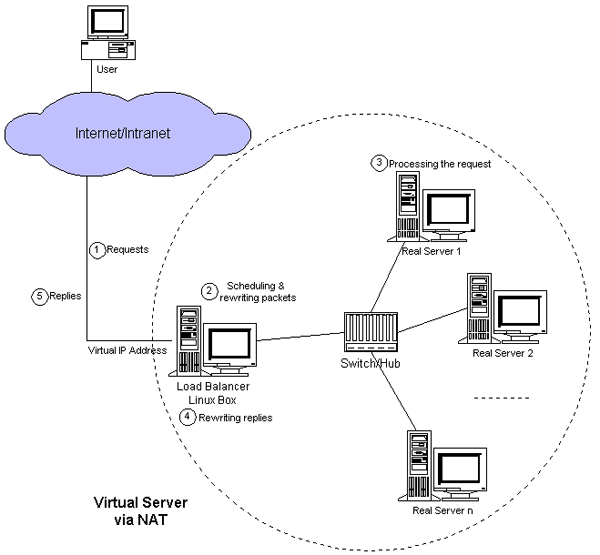
地址转换技术 DR 只需要将 VIP 配置到 DR 上,将受到的集群服务请求报文目标地址转换成根据算法计算得出的后端主机 IP 地址。

然后后端主主机将相应报文发送至 DR,再由 DR 将原地址转换成 VIP 地址。下面是他的网络拓扑图:

在 LVS(Director)上面需要两双网卡:DIP(内网)和 VIP(外网)

内网的 Real Server 主机的 IP 必须和 DIP 在同一个网络中,并且要求其网关都需要指向 DIP 的地址。

RIP 都是私有 IP地址,仅用于各个节点之间的通信,Director 位于 client 和 Real Server 之间,负责处理所有的进站、出站的通信,支持端口映射。

应用在较大规模的应用场景中,但 Director 容易成为整个架构的瓶颈。