分类 Golang 下的文章

在上一篇博文中,我们通过 curl 请求项 es 中添加了一条索引,提交数据的本质也是发送 http 请求。不过我们使用 curl 发送请求的时候没有提示,接下来我们使用 kibana 来提交数据。

目前大多数开发者应该都听说过 elk,e 就是es,其中的 k,就是 kibana ,一款为 es 设计的可视化工具,我们可以使用 kibana 来操作 es。

安装 kibana

docker pull blacktop/kibana:7.4

docker tag blacktop/kibnana:7.4 kb:7.4

版本必须和 es 保持一致。

启动 kibana

docker run --init -d --name kb -e elasticsearch.hosts="http://192.168.124.16:9200" \
 -p 5601:5601 kb:74

当启动成功后,我们访问 http://192.168.124.16:5601,点击 consolse。

console

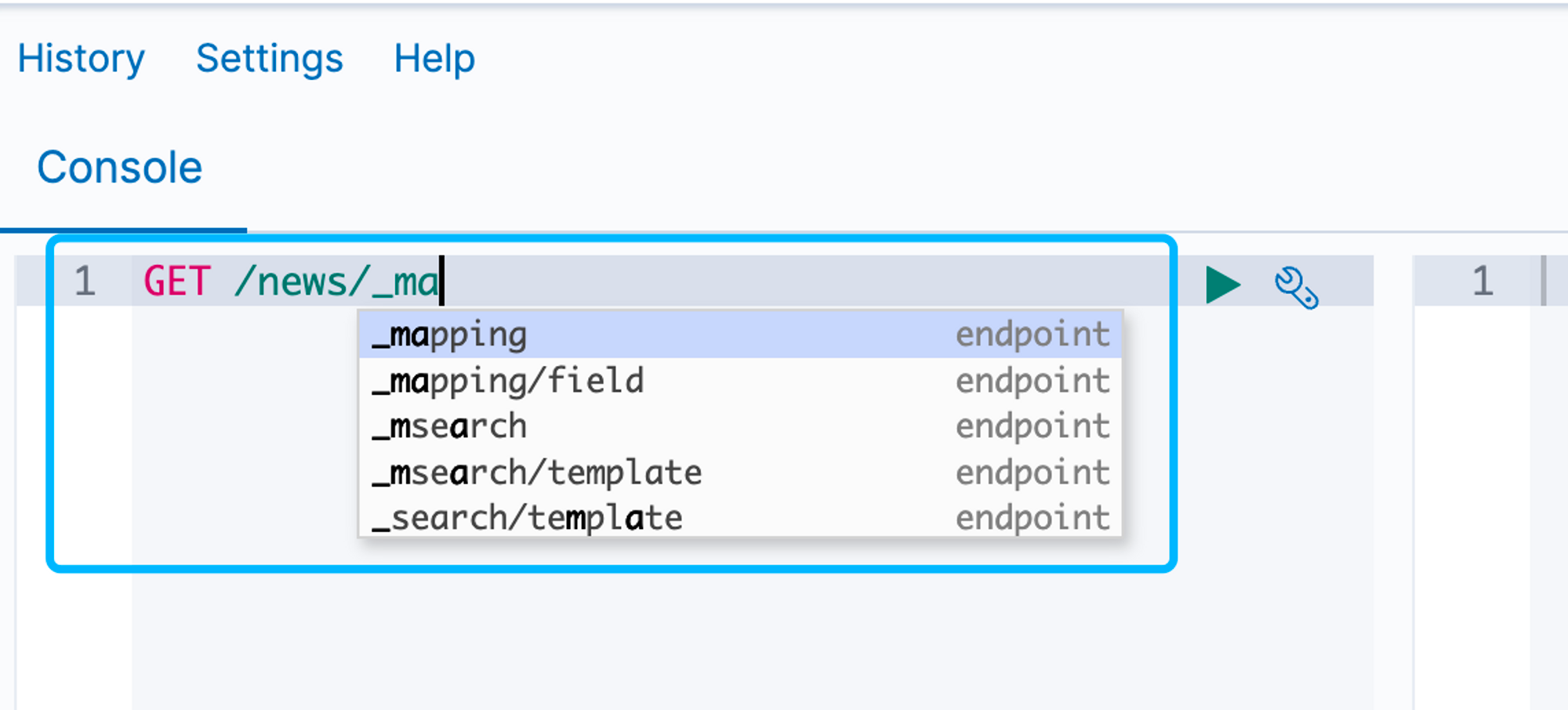
在 kibana 中输入请求是有提示的:

代码提示

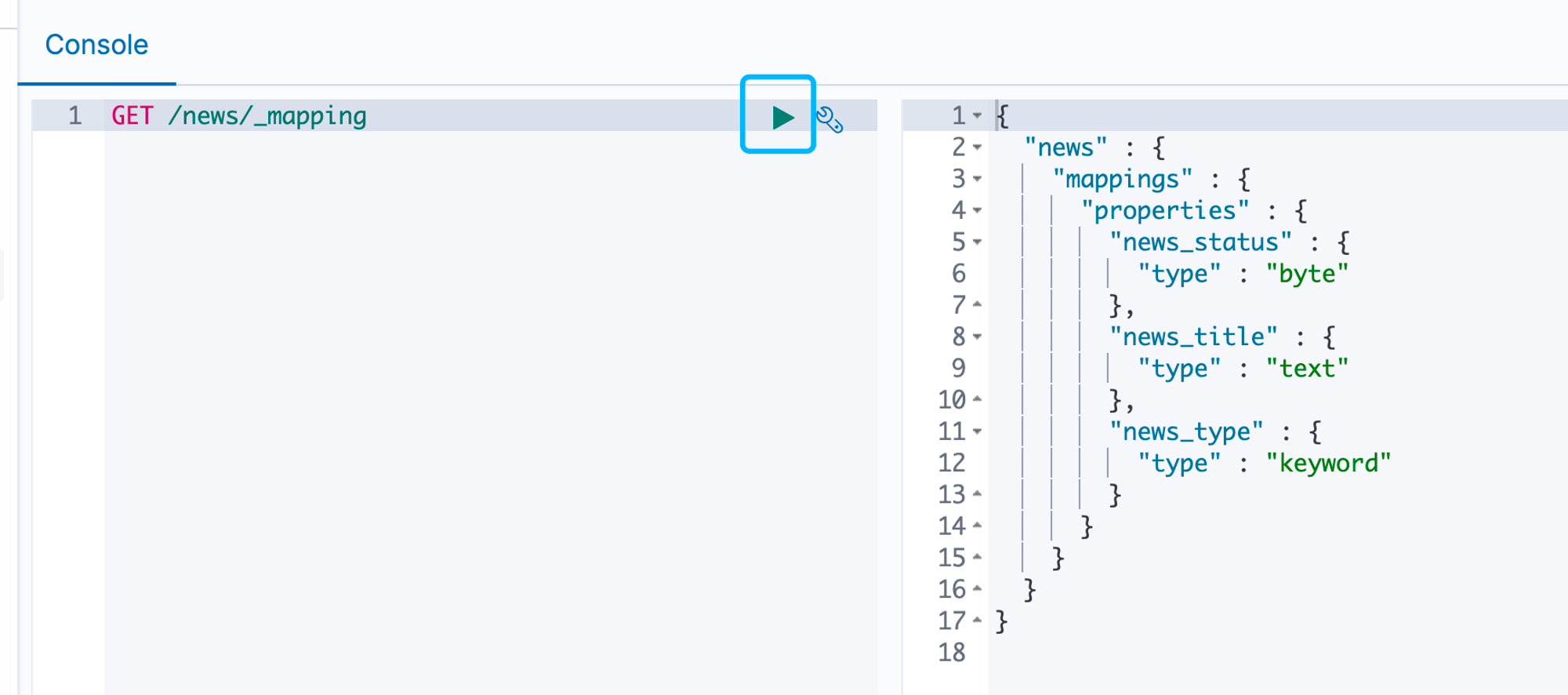
我们点击 play 按钮就会发送请求到 es 中。

play_button

这样我们就获得了在上节中设置的mapping。

用 GoSDK 向 ES 中插入第一条数据

接下来我们新增一个数据。

package main

import (
    "context"
    "fmt"
    "github.com/olivere/elastic/v7"
    "log"
)

func main() {
    client, err := elastic.NewClient(
        elastic.SetURL("http://192.168.124.16:9200/"),
        elastic.SetSniff(false),
    )
    if err != nil {
        log.Fatal(err)
    }
    ctx := context.Background()
    json := `{"news_title": "test1", "news_type":"php", "news_status":1}`
    data, err := client.Index().Index("news").Id("101").BodyString(json).Do(ctx)
    if err != nil {
        log.Fatal(data)
    }

    fmt.Println(data)
}
  • 在 es 中有 id 的概念,我们可以指定也可以自动生成,在这里我们指定了 id 为 101。
  • 我们用 BodyString 传入一个写死的 json 字符串,在真是项目中肯定是不会这么写!

接下来我们回到 kibana 中查看数据。
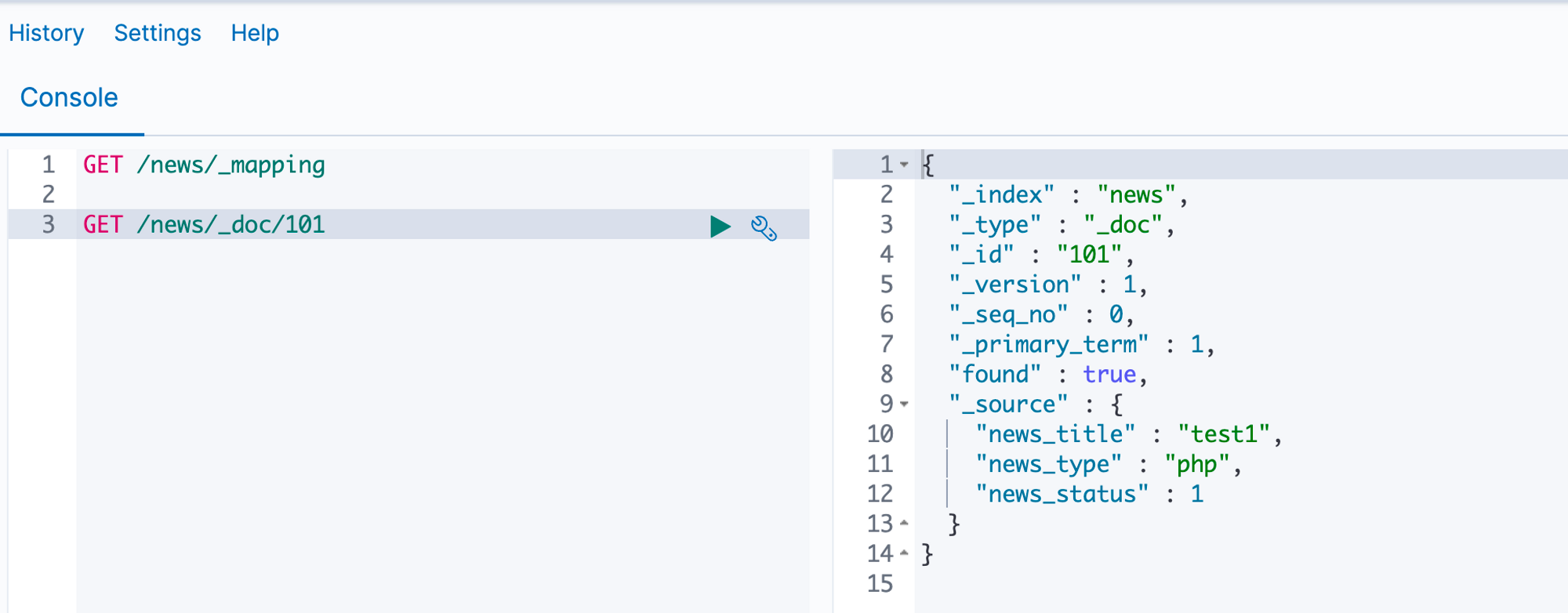
get

在 kibana 中可以查到我们的数据,证明写入成功了,其中 _source 存储的就是具体的值。

如果我们想要删除,只需要将 get 改为 DELETE 就可以了。
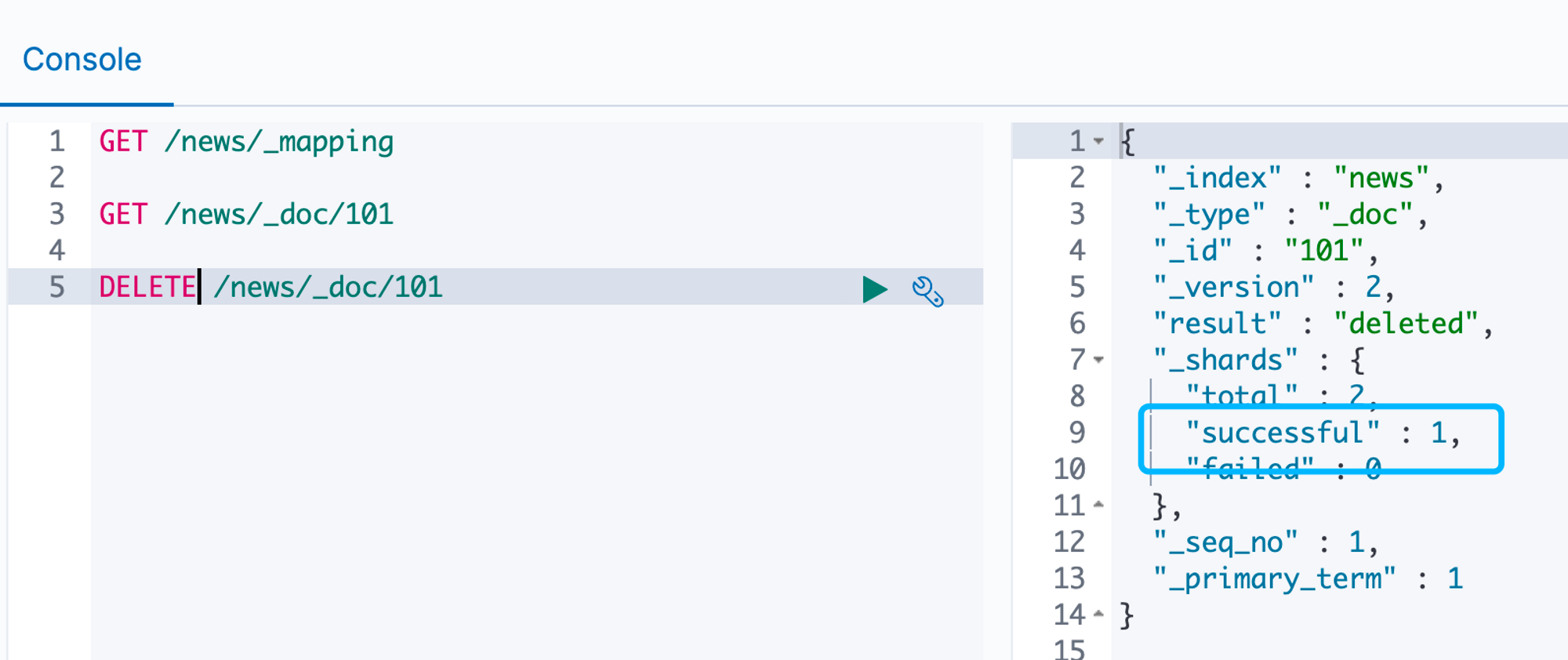
delete

successful:1 表示删除成功了,再去查询会发现 found: false,表示没有查询到数据。
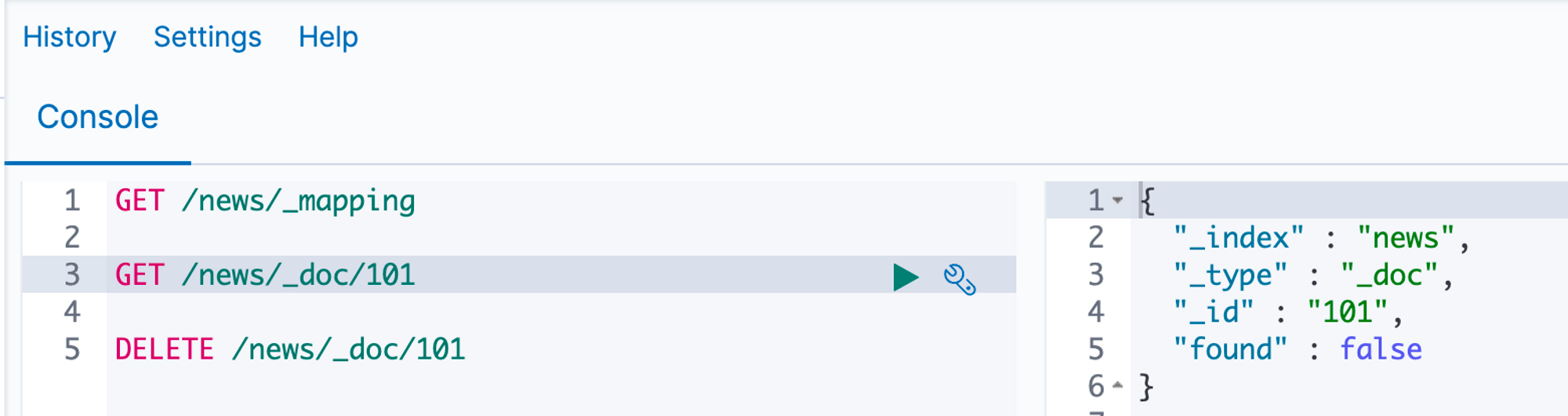
get2

快速部署

这里为了方便直接使用 Docker,官方镜像是 CentOS 镜像,不够美丽,因此我们使用了第三方的镜像,体积比较小,适合我们在学习过程中快速部署。

docker pull blacktop/elasticsearch:7.4

下载好后修改 tag,不然太长了

docker tag blacktop/elasticsearch:7.4 es:74

运行 ES。

docker run  -d --name es -p 9200:9200 es:74

如果我们是在虚拟机中使用 docker 那么内存尽量要大了一点,至少

有 4G 的内存。

执行 curl 看一下容器是否启动成功:

$ curl [http://192.168.124.16:9200/](http://192.168.124.16:9200/)
{
"name" : "832e35c81ff4",
"cluster_name" : "elasticsearch",
"cluster_uuid" : "tfwkn9ZKQNO0PD0iNfqdwg",
"version" : {
"number" : "7.4.2",
"build_flavor" : "oss",
"build_type" : "tar",
"build_hash" : "2f90bbf7b93631e52bafb59b3b049cb44ec25e96",
"build_date" : "2019-10-28T20:40:44.881551Z",
"build_snapshot" : false,
"lucene_version" : "8.2.0",
"minimum_wire_compatibility_version" : "6.8.0",
"minimum_index_compatibility_version" : "6.0.0-beta1"
},
"tagline" : "You Know, for Search"
}

GolangSDK

Go 的 SDK我们也选择第三方的库,因为目前官方的库还没有第三方实用。

go get github.com/olivere/elastic/v7

mapping

mapping 映射类似于在数据库中定义表结构,表里里有哪些字段、字段是什么类型。没有mapping 也能够创建索引,但是正规的方式是自己来创建 mapping,而不是动态映射。

例如现在一个 MySQL 中有一个news 表,其中存储的是新闻,表结构如下:

字段 name备注
news_id新闻 id
news_title新闻标题
news_type新闻类型(目前为中文)
news_status0 代表下架 1 正常 2 不可修改

在向 es 中导入的时候,我们可以不创建这个表结构,直接向 es中写入数据,es 可以进行类型推断,但是有的时候会推测错误,一般来说我们得先创建表结构。

同时向 es 写入数据有两种模式:

  1. 直接调用 es 的 api
  2. 通过 logstat 导入数据

一般我们不会选择第一种,而是直接选择使用 logstat 导入。

在 es 中字段一旦增加就不能删除了,只能新增,所以在最开始我们尽量就设计好,要不更改的时候会比较麻烦。

我们现在来创建 mapping,es 为我们提供了接口,我们使用 curl 发送请求创建接口

$ curl --location --request PUT 'http://192.168.124.16:9200/news' \
> --header 'Content-Type: application/json' \
> --data-raw '{
>     "mappings" : {
>         "properties" : {
>             "news_title": {
>                 "type": "text"
>             },
>             "news_type": {
>                 "type" : "keyword"
>             },
>             "news_status": {
>                 "type": "byte"
>             }
>         }
>     }
> }'
{"acknowledged":true,"shards_acknowledged":true,"index":"news"}

/news 是我们的索引名称,—data-raw 中就是我们要创建的数据。

创建完成后我们通过 get 方式可以查看 mapping。

curl --location --request GET 'http://192.168.124.16:9200/news/_mapping'
{"news":{"mappings":{"properties":{"news_status":{"type":"byte"},"news_title":{"type":"text"},"news_type":{"type":"keyword"}}}}}%

Go 查看 Mapping

接下来,我们用 golang 实现获取 mapping,代码其实非常简单:

package main

import (
    "context"
    "fmt"
    "github.com/olivere/elastic/v7"
    "log"
)

func main() {
    client, err := elastic.NewClient(
        elastic.SetURL("http://192.168.124.16:9200/"),
        elastic.SetSniff(false),
    )
    if err != nil {
        log.Fatal(err)
    }
    ctx := context.Background()
    mapping, err := client.GetMapping().Index("news").Do(ctx)
    if err != nil {
        log.Fatal(err)
    }
    fmt.Println(mapping)
}

# 代码运行结果
# map[news:map[mappings:map[properties:map[news_status:map[type:byte] news_title:map[type:text] news_type:map[type:keyword]]]]]

这里需要注意的是 elastic.SetSniff(false) ,当我们使用 elastic 的时候会自动转换地址,不过获取的地址由于我们使用的是 docker,这就导致获取IP 地址的时候其实得到的是容器的内容地址,我们是否无法访问的。

package main

import "fmt"

func main() {
    var f func()

    var a *struct{}

    list := []interface{}{f, a}

    for _, item := range list {
        if item == nil {
            fmt.Println("nil")
        }
    }
}

我们来看上面的代码,我们的第一反应应该是输出两个 nil,但事实上并非如此。我们来在 for 循环中输出 item。

    ...
    for _, item := range list {
    fmt.Println(item)
        if item == nil {
            fmt.Println("nil")
        }
    }
    ...

 title=

item 的两个输出的确是 nil ,因为我们只是定义了两个变量却没有对变量进行复制,所以他的值肯定就是 nil,但是为什么在判断的时候确认为他们不是 nil 呢?

首先,我们要知道 fmt.Println 打印数据的时候是打印出变量的值,也就是相当于 fmt.Printlf("%v\n" ,item) ,但是 item 其实是有类型的,我们先修改一下代码。

package main

import "fmt"

func main() {
    //var f func()

    var a *struct{}

    list := []*struct{}{a}

    for _, item := range list {
        if item == nil {
            fmt.Println("nil")
        }
    }
}

//output: nil

当我们将 list 的类型修改为 []*struct{} 的时候就可以正确判断了,那么就说明是由于 interface 导致的判断出错。

我们在对 interface 进行 != nil 判断的时候,必须值和类型都为 nil 的时候才可以,我们可以通过 reflect 反射包来判断 一个 interface 的值是否为 nil.

package main

import (
    "fmt"
    "reflect"
)

func main() {
    //var f func()

    var a *struct{}

    list := []*struct{}{a}

    for _, item := range list {
        if  reflect.ValueOf(item).IsNil() {
            fmt.Println("nil")
        }
    }
}

请求时间过长,用户侧可能已经离开本页面了,服务端还在消耗资源处理,得到的结果没有意义,同时过长时间的服务端处理会占用过多资源,导致并发能力下降,甚至出现不可用事故,一般一个请求是由多个串行或并行的子任务来完成的,每个子任务可能是另外的内部请求,那么当这个请求超时的时候,我们就需要快速返回,释放占用的资源,比如goroutine,文件描述符等。

我们可以利用管道了来决这个问题。

package main

import (
    "fmt"
    "sync"
    "time"
)
package main

import (
    "fmt"
    "time"
)

func job(ch chan<- struct{}) {
    time.Sleep(time.Second * 5)
    ch <- struct{}{}
}

var ch chan struct{}

func main() {
    ch = make(chan struct{}, 1)
    go func() {
        job(ch)
    }()

    select {
    case <-ch:
        fmt.Println("done")
    case <-time.After(time.Second * 3):
        fmt.Println("timeout process exit!")
    }

}

问题定义

很多人在做程序的时候在启动 Goroutine 的时候并没有限制其执行的数量,如果任务只有 100 个,1000 、10000 个 其实都没有问题,但是如果你执行任务非常耗时,而且数量特别大,在不断的开 Goroutine 的时候很有可能就崩溃了。

在服务器上执行任务的时候是需要限制执行数量的,如果超过设置的执行数量就需要进行等待。

现在我们来模拟一下这种情况的出现。

package main

import (
    "fmt"
    "sync"
    "time"
)

func job(i int) {
    time.Sleep(time.Millisecond * 500)
    fmt.Printf("执行完毕,序号 %d \n\n", i)
}

func main() {
    wg := sync.WaitGroup{}
    for i := 0; i < 10000000; i++ {
        wg.Add(1)
        go func(i int) {
            defer wg.Done()
            job(i)
        }(i)
    }
    wg.Wait()
}

在 Job 函数中,我们故意让函数 sleep 500 毫秒,用来模拟耗时操作,我们来执行一下。

...

执行完毕,序号 286128 

执行完毕,序号 20228 

panic: too many concurrent operations on a single file or socket (max 1048575)

goroutine 1432450 [running]:
internal/poll.(*fdMutex).rwlock(0x14000128060, 0x0?)
        /opt/homebrew/Cellar/go/1.18.2/libexec/src/internal/poll/fd_mutex.go:147 +0x13c
internal/poll.(*FD).writeLock(...)
        /opt/homebrew/Cellar/go/1.18.2/libexec/src/internal/poll/fd_mutex.go:239
internal/poll.(*FD).Write(0x14000128060, {0x14131074780, 0x20, 0x30})
        /opt/homebrew/Cellar/go/1.18.2/libexec/src/internal/poll/fd_unix.go:370 +0x48
os.(*File).write(...)
        /opt/homebrew/Cellar/go/1.18.2/libexec/src/os/file_posix.go:48
os.(*File).Write(0x14000126008, {0x14131074780?, 0x20, 0x14070f5f758?})
        /opt/homebrew/Cellar/go/1.18.2/libexec/src/os/file.go:176 +0x64
fmt.Fprintf({0x104434438, 0x14000126008}, {0x1043fe079, 0x1b}, {0x14070f5f758, 0x1, 0x1})
        /opt/homebrew/Cellar/go/1.18.2/libexec/src/fmt/print.go:205 +0x88
fmt.Printf(...)
        /opt/homebrew/Cellar/go/1.18.2/libexec/src/fmt/print.go:213
main.job(0x0?)
        /Users/guozhu/WorkSpace/study-go/go/main.go:11 +0x78
main.main.func1(0x0?)
        /Users/guozhu/WorkSpace/study-go/go/main.go:20 +0x50
created by main.main
        /Users/guozhu/WorkSpace/study-go/go/main.go:18 +0x40

Process finished with the exit code 2

刚开始执行其实是没问题的,但是等执行一会后 Go 就会报错了,panic: too many concurrent operations on a single file or socket (max 1048575)

对单个 file/socket 的并发操作个数超过了系统上限,这个报错是 fmt.Printf 函数引起的,fmt.Printf 将格式化后的字符串打印到屏幕,即标准输出。在 linux 系统中,标准输出也可以视为文件,内核(kernel)利用文件描述符(file descriptor)来访问文件,标准输出的文件描述符为 1,错误输出文件描述符为 2,标准输入的文件描述符为 0,简而言之就是内存耗尽了。

那如果我们将 fmt.Printf 这行代码去掉呢?那程序很可能会因为内存不足而崩溃。这一点更好理解,每个协程至少需要消耗 2KB 的空间,那么假设计算机的内存是 2GB,那么至多允许 2GB/2KB = 1M 个协程同时存在。那如果协程中还存在着其他需要分配内存的操作,那么允许并发执行的协程将会数量级地减少。

利用 Channel 限制 Goroutine 数量

make(chan struct{}, 3) 创建缓冲区大小为 3 的 channel,在没有被接收的情况下,至多发送 3 个消息则被阻塞。

利用这样特性,我们会可以在开启 Goroutine 调用 <- struct{}{},若缓存区满了则会被阻塞。当协程任务执行结束,在调用 <- ch 释放缓冲区,这样就可以限制 Goroutine 的数量了。

package main

import (
    "fmt"
    "sync"
    "time"
)

func job(i int) {
    time.Sleep(time.Millisecond * 500)
    fmt.Printf("执行完毕,序号 %d \n\n", i)
}

var pool chan struct{}

func main() {
    pool = make(chan struct{}, 1000)

    wg := sync.WaitGroup{}

    for i := 0; i < 10000000; i++ {
        pool <- struct{}{}
        wg.Add(1)
        go func(i int) {
            defer wg.Done()
            defer func() {
                <-pool
            }()
            job(i)
        }(i)
    }
    wg.Wait()
}